International
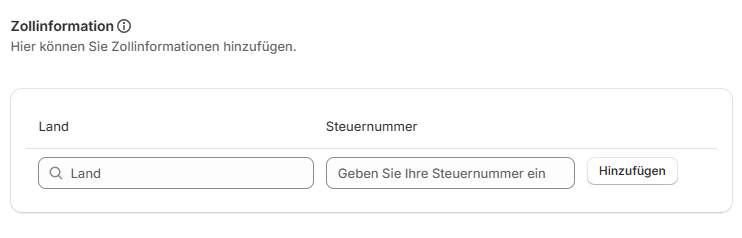
Customs information
Store your customs information here. Select the relevant country and enter the corresponding VAT identification number in the next field.
You can store several countries and their corresponding VAT identification numbers. These are required by customs when shipping to non-EU countries.
Further product-level information is required for shipments to non-EU countries. See Shipping to non-EU countries.
Closest Droppoint
Follow these steps to use Closest Droppoint (CDP) in the app:
CDP must have been activated in your DHL business customer contract by DHL Sales.
Step 1
In Shopify Admin, go to Apps → Post & DHL Shipping (official).
Step 2
From the dashboard, go to Accounts → Parcel - #00000000000 → Edit.
Step 3
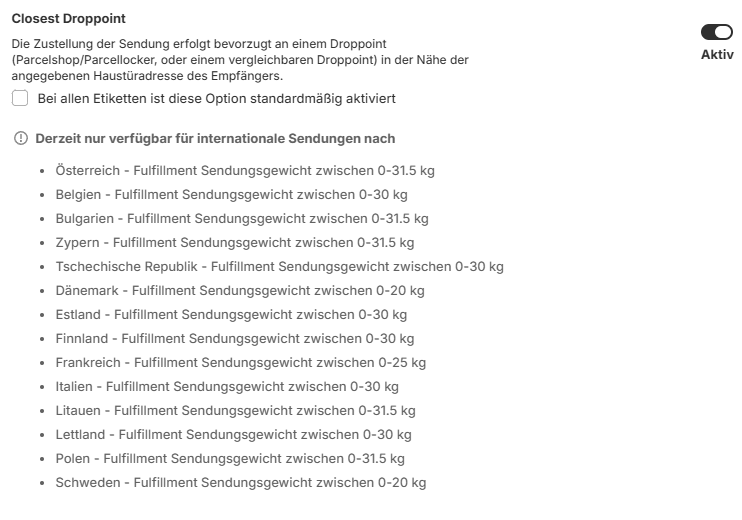
In the Edit account view, go to Customs → Closest Droppoint → Activate.
Step 4
(Optional) Select This option is activated by default for all labels to preselect it automatically.
After completing these steps, the Closest Droppoint service appears under AVAILABLE OPTIONS on the Create Label page when you create a shipping label for an eligible destination.

Further information about the service is available from DHL Paket International.
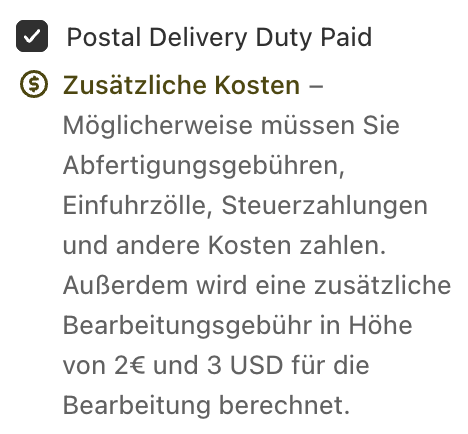
Postal Delivery Duty Paid
This service is relevant because of the new guidelines for shipments to the USA: Shipping to the USA.
Follow these steps to use PDDP (Postal Delivery Duty Paid) in the app:
PDDP must have been activated in your DHL business customer contract by DHL Sales.
Step 1
In Shopify Admin, go to Apps → Post & DHL Shipping (official).
Step 2
From the dashboard, go to Accounts → Parcel - #00000000000 → Edit.
Step 3
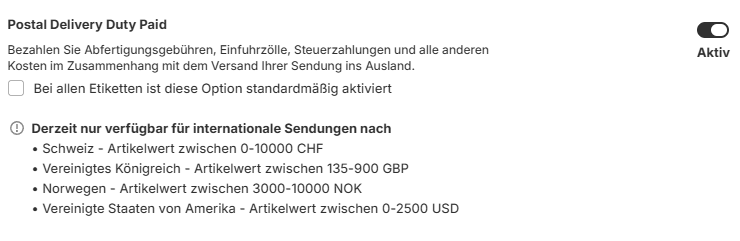
In the Edit account view, go to Customs → Postal Delivery Duty Paid → Activate.
Step 4
(Optional) Select This option is activated by default for all labels to preselect it automatically.
After completing these steps, the Postal Delivery Duty Paid service appears under AVAILABLE OPTIONS on the Create Label page when you create an eligible shipping label to the USA.